
Training Courses for the NJIT Community
The NJIT Makerspace offers a variety of training courses to educate members on the safe and proper use of our equipment.
Training Courses
To register for MAKE 101, the required prerequisite for all MAKE courses and to enroll in other MAKE courses after completing MAKE 101, please click on the link seen below:
Canvas Link to Makerspace Trainings
MAKE 101 - Introduction to the Makerspace
Prerequisites: None
This course, with embedded quiz questions, is the starting point for new members covering the basics of operating safely in the Makerspace, tool safety, and EHS policy. It also explains how to receive additional equipment training, access tools and storage, and simple ways for new makers to get started. Completion of this training earns you the MAKE 101 digital badge.
Note: MAKE 101 is a required prerequisite for all other MAKE courses. Students must successfully complete and pass MAKE 101 before enrolling in any subsequent MAKE offerings.
MAKE 102 - Introduction to Laser Engraving and Cutting
Prerequisites: MAKE 101
MAKE 102 is an online video training with embedded quiz questions that teaches the basics of laser cutter operation and theory. Workflows for file preparation, operation of laser cutters, job monitoring, safety are also discussed. Completion of this training earns you the MAKE 102 digital badge.
MAKE 103 - Introduction to 3D Printing
Prerequisites: MAKE 101
An introductory course with embedded quiz questions, is required to use the Makerspace's FDM 3D printers. Briefly covers the basics of 3D printing including basic operation, model preparation and slicing, starting, monitoring, and removing a print. Completion of this training earns you the MAKE 103 digital badge.
Note: Completion of MAKE 101, MAKE 102, and MAKE 103 earns you the MAKERSPACE BASICS digital badge.
MAKE 106 - Introduction to 3D Scanning (By appointment)
Prerequisites: MAKE 101
An introductory course.
MAKE 202 - Introduction to Fiber Laser Cutting (By appointment)
Prerequisites: MAKE 101
An introductory course.
MAKE 203 - Introduction to SLA 3D Printing
Prerequisites: MAKE 103
Building on Make 103, this course covers stereolithographic 3D printing, a printing process that involves curing a photopolymer resin layer-by-layer. Briefly covers design considerations, slicing, starting and removing prints.
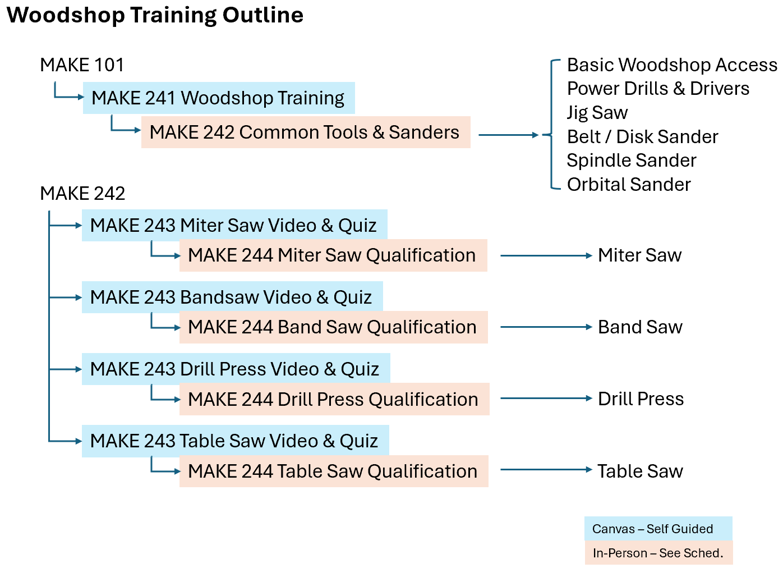
MAKE 241 - Woodshop Training
Prerequisites: MAKE 101
This online course introduces students to the NJIT Makerspace Woodshop, providing the foundational knowledge needed to work safely and effectively with woodworking tools and materials. Through this training, you will learn general woodshop practices, essential safety protocols, an overview of common materials, and proper measuring techniques. Completion of this course ensures that you are prepared to make the most of your hands-on training experience in the Makerspace. At the end of the course, you will be required to complete a quiz, and a minimum score of 90% is required before you may register for the in-person training sessions. Once students pass the quiz and complete the Woodshop Safety Contract, they will receive instructions to sign up to MAKE242.
MAKE 242 - Common Tools & Sanders
Prerequisites: MAKE 241
MAKE 242 is an in-person training that students are able to sign up for in Canvas after completing MAKE241. Students in this training will receive in-person instruction on proper tool use and safety in the woodshop and, upon completion, will receive MAKE242 Badges through the Parchment system. Students with MAKE242 badges are allowed to enter the woodshop during open woodshop times and use the following:
- Power drills & drivers
- Spindle sander
- Jig saw
- Orbital sander
- Belt & disk sander
- Common layout & measuring tools
MAKE 243 - Introduction to Common Stationary Tools
Prerequisites: MAKE 242
This online training module introduces you to four essential stationary tools in the NJIT Makerspace Woodshop including the drill press, miter saw, table saw, and bandsaw. Students will watch training videos demonstrating how each tool works, its basic controls, common risks associated with its use, and the key safety practices that protect them and others in the woodshop. Students will be required to complete a quiz in Canvas to demonstrate their comprehension of the information in the training video.
Students should watch whichever training video they’re interested in. Following each video, they should complete the associated quiz. Successful completion of one of the machine-specific quizzes will allow them to attend the associated in-person MAKE244 machine qualification.
Each training video in MAKE243 can be undertaken independent of the other training videos in MAKE243. In fact, it is recommended that students focus on a single machine’s training video and quiz, then complete their machine specific training with MAKE244 in-person qualification before moving on to undertake another MAKE243 machine training video.
MAKE 244 - Common Stationary Tools
Prerequisites: MAKE 243
This in-person machine qualification session builds on the online learning from MAKE243 by giving students a chance to watch a live demonstration, ask questions and get practice using the machine under instructor supervision. In order to attend an open qualification session for a specific machine, students must pass the relevant MAKE243 online quiz.
Students interested in qualifying for a specific MAKE244 machine, should arrive at the woodshop 5 minutes prior to a scheduled MAKE244 Machine Qualification session. See the latest Woodshop Schedule for available times. Upon arrival, students should add their names to the check-in list and be prepared to verify that they completed the relevant MAKE243 training video quiz. They’ll receive instructions from the woodshop instructor at that time.
Students will be qualified on machines on a first come / first serve basis and, if possible, groups of students seeking the same machine qualification will be qualified at the same time. Demand for machine qualification ebbs and flows throughout the semester. As such, students should plan to qualify well ahead of the time they anticipate needing to use the equipment. When qualification time is in high demand, students may expect to wait for some time after they arrive.
Students who complete this MAKE244 Machine Specific training will receive Badges through the Parchment system which will allow them to perform the operations using the equipment they were trained on during open woodshop times.